The FairPlay app is an Android APK that you download from a button on fairplay.global; the app stores only carry lookalikes. On 11 November 2026 that button served a file called FP_V5.0.0.apk, 2.5 MB in size, from a separate domain. We saved a copy to an isolated folder and read its manifest without installing it. Below is what’s inside, and the checks worth doing before you sideload anything that carries FairPlay’s name.
Where does the FairPlay app download come from?
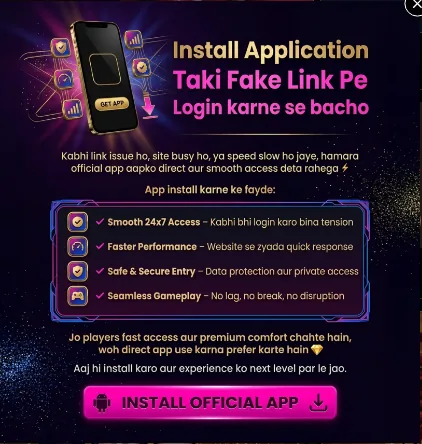
Open fairplay.global and a pop-up appears within seconds. In Hinglish it says, roughly, “Install the app so you don’t log in through a fake link”, and promises that the app keeps working when the site is slow or a link stops opening. The login page repeats the offer with a green “Download .apk” button and a “Share This APK With Friends” button underneath.
The file doesn’t come from fairplay.global itself. The button points to a different domain with no visible connection to the brand. We are not linking it. An app sold as protection against fake links, served from an address that has nothing to do with the brand, is an odd way to earn trust.
What’s inside the FairPlay APK?
The package name is com.example.ffaiirpplayy_v4. Android Studio fills in com.example as a placeholder when someone starts a new project; published apps normally replace it with the developer’s own domain. The rest is small: one code file, no native libraries and Android’s web-browser components. Put together, that looks like a thin shell around the website rather than a separate app.
What the manifest asks for:
| Permission | What it lets the app do | In v5.0.0? |
|---|---|---|
| Internet, network state | Load the site, check your connection | Yes |
| Post notifications (Firebase, OneSignal) | Send push messages | Yes |
| Start at boot, foreground service, wake lock | Keep push messages running in the background | Yes |
| Read and write storage | Save files, such as downloaded updates | Yes |
| Request install packages | Prompt you to install another APK | Yes |
| SMS, call log, contacts | Read OTPs and your address book | No |
| Location, camera, microphone | Track or record you | No |
| Accessibility service | Read and tap the screen for you | No |
So this build doesn’t look like spyware. The catch is the install-packages permission. Whoever runs the app can put a new APK in front of you at any time, and you’d be trusting an anonymous publisher to send a clean one.
Is the FairPlay apk download safe to install?
Safer than a random “FairPlay latest version” file from a Telegram channel, maybe. Safe, no. You’d be installing software from a publisher with no name, outside any store review, to use a service that is illegal in India. If you are going to do it anyway, the five checks at the end of this page catch the most common fakes.
Can you get the FairPlay app on iPhone?
fairplay.global has no iOS download. Searching the Indian App Store for “FairPlay” on 11 November 2026 brought up a live-scores app and a sports-predictions app from other developers, neither of them linked from fairplay.global. Apple doesn’t allow real-money gambling apps without a licence for the country they serve, and India issues none for this kind of product. On an iPhone the only route is the website in a browser. “Install our iOS app” messages that come with a configuration profile or a test-build invite give the sender a lot of control over your phone. Decline them.
Why isn’t FairPlay on Google Play?
Two walls. Google’s policy lets real-money gambling apps in only where the developer holds a licence for each country of distribution. And India’s gaming law, in force from May 2026, outlaws online money games nationwide and lets the government block any app that offers them. An Indian Play Store listing is off the table. What you do find there under the name is unrelated: on 11 November 2026 a search returned a football-scores app called “Fairplay” and a travel eSIM service called FairPlay Mobile. Neither is the betting app, and fairplay.global links to neither.
Does the app get around blocks in India?
That’s the practical pitch of the pop-up: when a link stops opening, the app keeps going. An app can switch the server it talks to without telling you, so a blocked domain may not affect it. That doesn’t make anything legal. It only means you won’t see when the address underneath changes, or who now holds your login. Our FairPlay login page covers what to do when access breaks.
This one sends you to a third-party brand, not necessarily FairPlay. Readers in India should skip it.
Step by step
- Read the link before you tap itLong-press the download button and look at the domain. On fairplay.global it pointed to an unrelated domain; a link passed on through Telegram or a YouTube description adds yet another stranger in the middle.
- Compare the sizeThe v5.0.0 file we checked was 2,576,029 bytes. A file claiming the same version at a very different size is not the same file.
- Leave Play Protect onAndroid scans sideloaded apps at install time. If an installer tells you to switch Play Protect off, stop there.
- Read the permission screenThe build we unpacked needs no SMS, contacts or accessibility access. If a 'FairPlay' install asks for any of those, cancel it: that is how OTP-stealing apps work.
- Turn 'install unknown apps' back offGive your browser that permission only for the install, then revoke it under Settings, Apps, Special app access.